Tag Archives: cisco

CCENT and CCNA Simulation Practice Pack with Email Mentoring

CCNA Exam

Are you ready to practice for the potential simulations in your CCENT and/or CCNA exams? Do you have questions about these technologies or the simulations you might face?

Enjoy the AJSnetworking.com CCENT/CCNA Simulation Practice Pack. Order yours now at this introductory rate and experience your email mentoring service immediately!

Look at this comprehensive content – all for only $29.95!


Simulations use Packet Tracer and include tasks with full solutions. You are also provided with all initial and final configurations! This permits you to use the simulator or emulator or real gear of your choosing!

ICND1

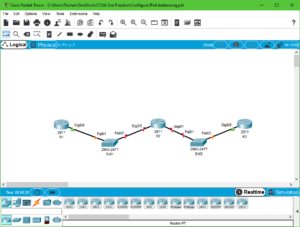
  1. Configuring IPv4 Addressing
  2. Configuring IPv6 Addressing
  3. Configure IPv6 Stateless Address Auto Configuration
  4. Configure VLANs
  5. Troubleshoot VLANs
  6. Configure Trunks
  7. Trunk Troubleshooting
  8. Configuring and Verifying Port Security
  9. Configure Inter-VLAN Routing (ROAS)
  10. Inter-VLAN Routing (SVIs)
  11. Configure IPv4 Static Routing
  12. Configuring IPv6 Static Routing
  13. Configure RIPv2
  14. RIPv2 Troubleshooting
  15. DHCP Configuration
  16. NTP Configuration
  17. Configure Syslog

ICND2

  1. Configure STP
  2. Configure EtherChannels
  3. Configure OSPFv2
  4. Configure OSPFv3
  5. Troubleshooting OSPF
  6. Configure EIGRP for IPv4
  7. Configure EIGRP for IPv6
  8. Troubleshooting EIGRP
  9. Configuring the WAN
  10. Configuring HSRP
  11. Configuring SNMP
  12. Configuring SPAN
  13. Configure ACLs
  14. Configure NAT
  15. Configure Basic Device Hardening


CCNA Data Center – Overlay Transport Virtualization (OTV) Terms

Overlay Transport Virtualization

Remember, we love OTV because it has the ability to connect Data Centers and make it appear as if they are connected Layer 2 domains. While there are other technologies that can do this, OTV is appealing for many reasons including its flexibility and simplicity of configuration and operation.

In order to understand the further study of OTV, you really need to be able to speak its language, and that means learning some terms that are commonly used to describe it. Here they are:

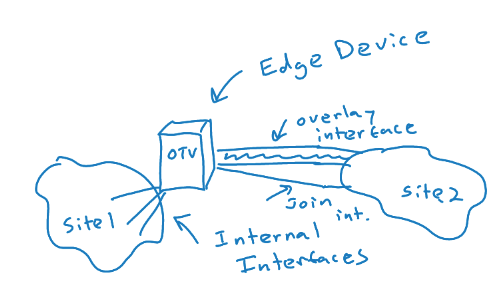
  • OTV Edge Device – this device takes the Layer 2 frames and encapsulates them in Layer 3 packets; in a “classic” implementation, the OTV device is a VDC of a Nexus 7K
  • OTV Internal Interface – a layer 2 interface on an edge device that connects to the VLANs that are to be encapsulated
  • OTV Join Interface – a Layer 3 interface that is used to join the two domains and discover the remote OTV device
  • Transport Network – the network connecting the OTV sites
  • Overlay Network – the logical network that connects the two OTV devices
  • Site VLAN – a VLAN that carries hellos between edge devices that might exist at the same site; it is best to use a dedicated VLAN for this role; this VLAN is not extended across the overlay
  • AED – the Authoritative Edge Device is elected for a site and is the designated forwarding edge device; devices maintain adjacency with each edge device in a site (site adjacency); they use the Site VLAN for this purpose; they also maintain the overlay adjacency using the join interface to a remote site